
Building a Scalable SaaS with Laravel Multi-Tenancy and Spatie Permissions
Modern SaaS applications must support multiple organizations, each with its own users, roles, and data—while running on a single codebase. This is where multi-tenancy comes in. When combined with Laravel and Spatie Permissions, you can build a clean, secure, and highly scalable authorization system suitable for real-world SaaS products.
This article explains how Laravel multi-tenancy works with Spatie Permissions, covering architecture decisions, role management, and best practices used in production systems.
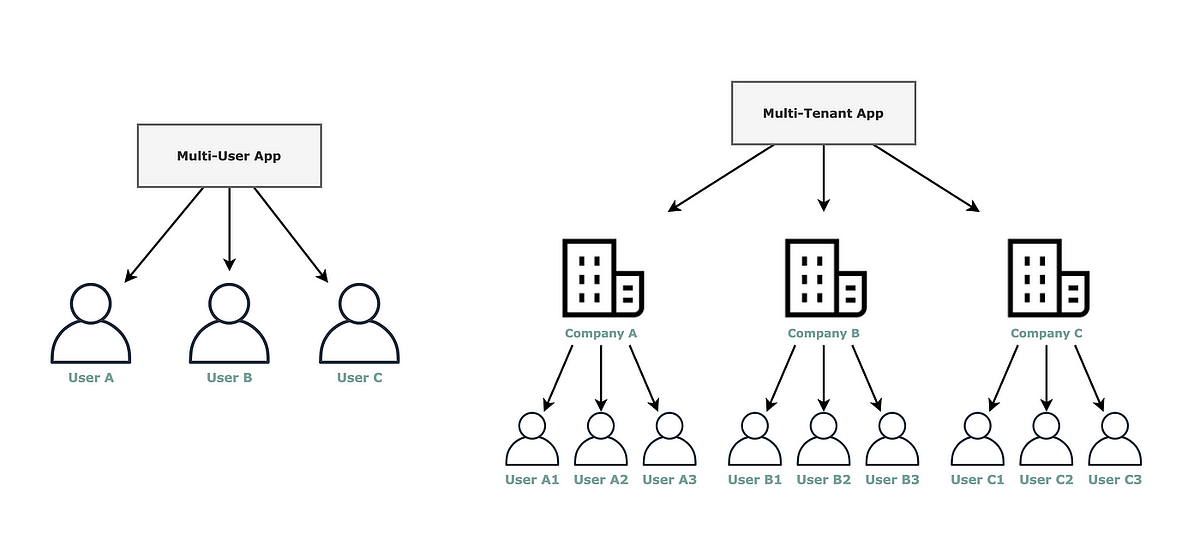
What Is Multi-Tenancy?
Multi-tenancy is an application architecture where a single application instance serves multiple tenants (organizations or customers), while keeping their data isolated and secure.
Each tenant:
- Has its own users
- Has its own roles & permissions
- Can have custom settings and configurations
All of this happens without duplicating code or infrastructure.
Why Combine Laravel with Spatie Permissions?
Laravel provides a strong foundation for multi-tenant systems through:
- Middleware
- Service container
- Database connection management
- Queues, caching, and policies
Spatie Permissions adds:
- Role-based access control (RBAC)
- Permission inheritance
- Middleware-based authorization
- Database-driven permission management
- Built-in caching for performance
Together, they form a powerful SaaS-ready authorization layer.
Recommended Architecture Overview
A clean multi-tenant system separates platform data from tenant data.
Central (System) Database
Used for shared entities:
- Users
- Tenants
- Subscriptions & plans
- Tenant-user relationships
- Platform-level admins
Tenant Databases (or Tenant-Scoped Tables)
Used for tenant-specific data:
- Roles
- Permissions
- Business entities
- Orders, leads, CRM data
- Domain-specific records
This separation ensures:
- Strong data isolation
- Easier scaling
- Better security
- Independent tenant backups
Tenant Identification & Context Resolution
Before permissions can be checked, the application must know which tenant is active.
Common tenant identification strategies:
- Subdomain (tenant1.app.com)
- Custom domain (clientdomain.com)
- Tenant selector after login
- Request headers (API-based SaaS)
Once identified:
- Tenant is resolved
- Tenant context is stored
- Database connection is switched
- Authorization logic runs inside tenant scope
This step is critical—permission checks must never run without tenant context.
How Spatie Permissions Fit into Multi-Tenancy
In a tenant-based system:
- Each tenant has its own roles
- Each tenant defines its own permissions
- Same role names can exist across tenants
- Users may belong to multiple tenants with different roles
Example
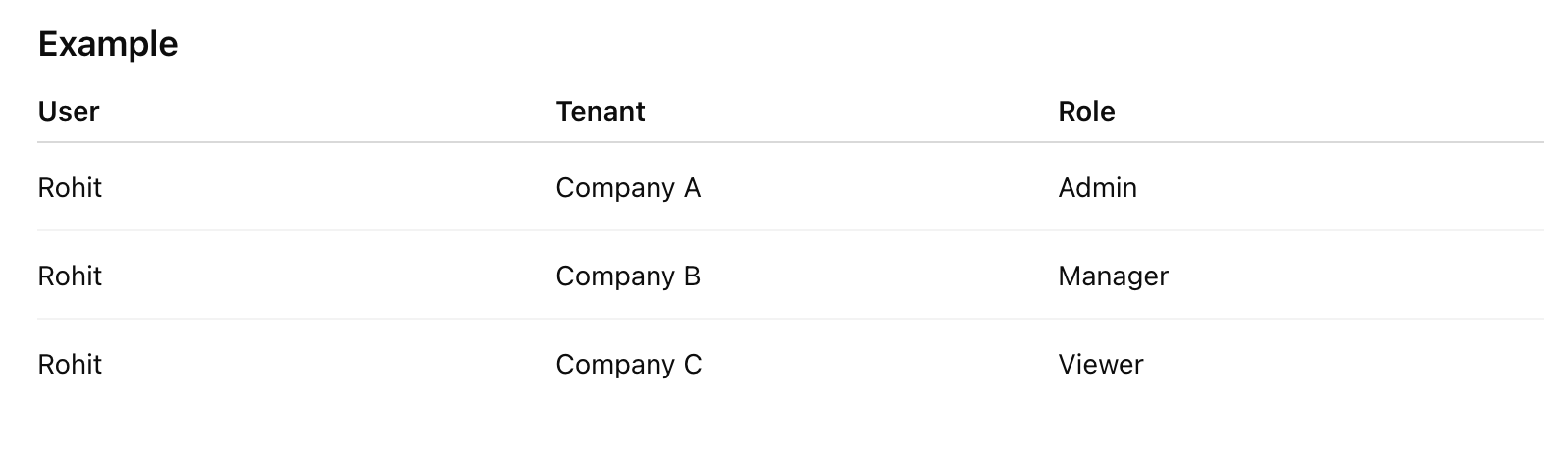
Spatie Permissions handles this perfectly when scoped to tenant databases or tenant IDs.
Assigning Roles and Permissions per Tenant
Typical flow:
- Tenant admin creates roles (Admin, Staff, Support)
- Permissions are defined per tenant
- Users are assigned roles within that tenant
- Authorization checks happen automatically
Because the tenant context is already active:
- Controllers stay clean
- Policies remain readable
- No manual permission checks needed
Middleware-Based Authorization
Tenant-aware middleware ensures:
- Tenant is resolved first
- Permissions are checked next
Example access control:
- Only tenant admins can manage users
- Managers can view reports
- Staff users have limited access
This approach scales cleanly as the application grows.
Handling Super Admins (Platform Owners)
Super Admins are platform-level users, not tenant users.
Best practice:
- Store Super Admin role in the central database
- Bypass tenant permission checks
- Never mix platform roles with tenant roles
This avoids security loopholes and simplifies logic.
Tenant Provisioning Workflow
When a new tenant is created:
- Create tenant record in central DB
- Create tenant database or schema
- Run tenant migrations
- Run Spatie permission migrations
- Seed default roles & permissions
- Assign tenant admin role
Automating this flow is essential for SaaS platforms.
Performance & Caching
For large-scale applications:
- Cache permissions per tenant
- Cache tenant configuration
- Use Redis for fast lookups
- Queue heavy permission sync tasks
- Index permission tables properly
Spatie’s permission cache works well when cleared per tenant.
Security Best Practices
Multi-tenant authorization must be airtight:
- Never trust tenant IDs from the client
- Always resolve tenant server-side
- Apply tenant scope globally
- Write tests for cross-tenant access
- Log permission changes
- Encrypt sensitive tenant data
A single authorization bug can expose another tenant’s data, which is unacceptable in SaaS.
Real-World Use Cases
This architecture is ideal for:
- SaaS dashboards
- CRM systems
- B2B platforms
- HR & payroll software
- Real estate portals
- White-label admin panels
Conclusion
Laravel Multi-Tenancy combined with Spatie Permissions provides a clean, scalable, and enterprise-ready solution for SaaS authorization.
When designed correctly, it delivers:
- Strong tenant isolation
- Flexible role management
- Clean authorization logic
- High performance at scale
The key is discipline:
Resolve tenant early, scope everything, and never mix platform and tenant concerns.
Tagged with
Written by Rohit Vakhariya
Passionate about sharing knowledge and insights on web development, technology, and best practices.